---
title: Setting up your solar in the Homely App
description: Guides users through configuring Solar Sense in their Homely
---
[Skip to content](https://help.homelyenergy.com/knowledge/setting-up-your-solar-in-the-homely-app#main-content)
English
Show submenu for translations
[Contact us](https://help.homelyenergy.com/knowledge/kb-tickets/new?hsLang=en)
[![Homely logo white.png\]](https://help.homelyenergy.com/hs-fs/hubfs/Homely%20logo%20white.png?height=40&name=Homely%20logo%20white.png)](https://help.homelyenergy.com/knowledge?hsLang=en)
Open main navigation
Close main navigation
- English
Show submenu for translations
- [Contact us](https://help.homelyenergy.com/knowledge/kb-tickets/new)
How can we help?
- There are no suggestions because the search field is empty.
1. [Knowledge base](https://help.homelyenergy.com/knowledge?hsLang=en)
2. [Using Homely](https://help.homelyenergy.com/knowledge/using-homely?hsLang=en)
3. [Solar Sense](https://help.homelyenergy.com/knowledge/using-homely?hsLang=en#solar-sense)
# Setting up your solar in the Homely App
**Adding your solar details helps Homely optimise more accurately.**
Solar Sense is part of **Smart+**, so you need to be on our Smart+ plan to be able to add your solar to Homely. Once you’re on Smart+ and have added your solar details, Homely can begin optimising with your solar setup in mind.
The setup is quick and flexible and you can update everything later if your setup changes.
### Step 1: Sign up to Smart+
If you’re not already on Smart+, you’ll be guided through signing up as part of the Solar Sense setup. Smart+ opens up extra features, including Solar Sense.
Once you’re on Smart+, you can add your solar details straight away.
### Step 2: Add your solar details
To allow Homely to optimise your heating and hot water around your solar generation, you’ll need to add details of your solar panel system to your account.
1. Open **Account Management** in the Homely app, or access it directly using the provided [link](https://account.homelyenergy.com/).
2. Select **Solar Sense**
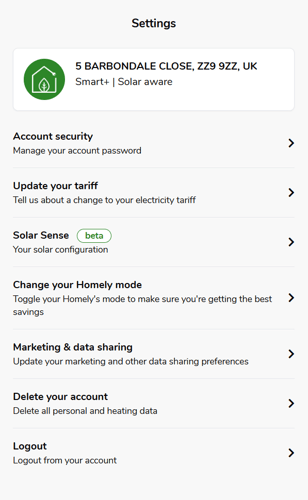
3. Click **Add Roof**.
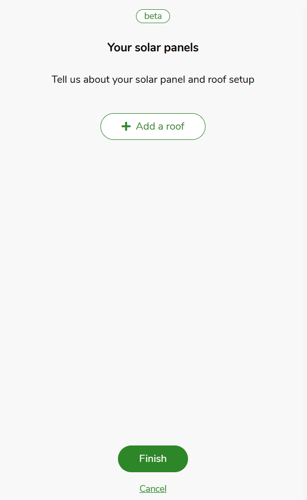
4. Enter the details for the roof face where your solar panels are installed.
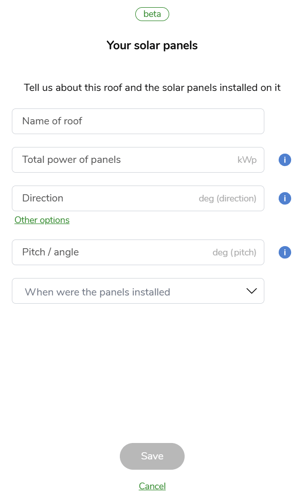
5. Click **Save**.
6. If your solar panels are installed across multiple roof faces, click **Add Roof** again and enter the details for each additional roof section.
7. Ensure **Optimise using my solar panels** is switched on (the toggle should be **Green**) and enter the details of your electricity **export tariff**, if applicable.
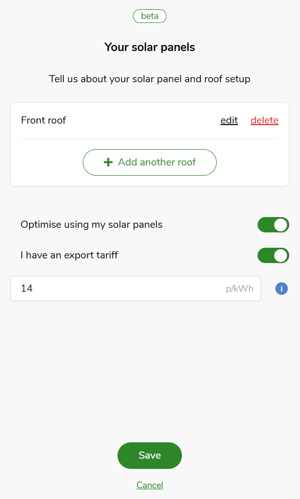
8. Click **Save** to confirm your changes.
These details help Homely understand likely solar generation patterns, rather than using live solar data or controlling your system.
### What happens after setup?
Once your solar details are added:
- Solar Sense is enabled as part of Smart+
- Homely begins optimising with your solar setup in mind
- Optimisation happens automatically in the background
- You’ll receive a monthly recap straight to your emails about your solar usage
### Can I change this later?
Yes. You can update, edit, or turn off Solar Sense at any time from your solar settings. If your solar setup changes, simply update your details and Homely will adjust future optimisation accordingly.
### One last thing: check your tariff details
For the best optimisation experience, it’s important to keep your energy tariff details up to date. Your tariff helps Homely understand how energy is priced for your home, which works alongside Solar Sense to inform optimisation decisions.
If your tariff changes, make sure to update it in Homely so optimisation continues to reflect your setup accurately.
- [Getting Started](https://help.homelyenergy.com/knowledge/getting-started?hsLang=en#main-content)
- [Your Homely System](https://help.homelyenergy.com/knowledge/getting-started?hsLang=en#your-homely-system)
- [Before you buy](https://help.homelyenergy.com/knowledge/getting-started?hsLang=en#before-you-buy)
- [Benefits of Homely](https://help.homelyenergy.com/knowledge/getting-started?hsLang=en#benefits-of-homely)
- [Heat Pump Functions](https://help.homelyenergy.com/knowledge/getting-started?hsLang=en#heat-pump-functions)
- [Using Homely](https://help.homelyenergy.com/knowledge/using-homely?hsLang=en#main-content)
- [Setting up your Preferences](https://help.homelyenergy.com/knowledge/using-homely?hsLang=en#setting-up-your-preferences)
- [Smart+ Features](https://help.homelyenergy.com/knowledge/using-homely?hsLang=en#smart-features)
- [Account Management](https://help.homelyenergy.com/knowledge/using-homely?hsLang=en#account-management)
- [Usage Data](https://help.homelyenergy.com/knowledge/using-homely?hsLang=en#usage-data)
- [Solar Sense](https://help.homelyenergy.com/knowledge/using-homely?hsLang=en#solar-sense)
- [Homeowner Troubleshooting](https://help.homelyenergy.com/knowledge/homeowner-troubleshooting?hsLang=en#main-content)
- [FAQs](https://help.homelyenergy.com/knowledge/homeowner-troubleshooting?hsLang=en#faqs)
- [Hardware](https://help.homelyenergy.com/knowledge/homeowner-troubleshooting?hsLang=en#hardware)
- [Switching to Heat Pump Controller](https://help.homelyenergy.com/knowledge/homeowner-troubleshooting?hsLang=en#switching-to-heat-pump-controller)
- [Heat Pump Errors](https://help.homelyenergy.com/knowledge/homeowner-troubleshooting?hsLang=en#heat-pump-errors)
- [Installer Resources](https://help.homelyenergy.com/knowledge/installer-resources?hsLang=en#main-content)
- [Why Homely](https://help.homelyenergy.com/knowledge/installer-resources?hsLang=en#why-homely)
- [Configuring Homely](https://help.homelyenergy.com/knowledge/installer-resources?hsLang=en#configuring-homely)
- [Compatibility and System Design](https://help.homelyenergy.com/knowledge/installer-resources?hsLang=en#compatibility-and-system-design)
- [Manuals](https://help.homelyenergy.com/knowledge/installer-resources?hsLang=en#manuals)
- [Connect](https://help.homelyenergy.com/knowledge/connect?hsLang=en#main-content)
- [About Connect](https://help.homelyenergy.com/knowledge/connect?hsLang=en#about-connect)
- [Managing Installations](https://help.homelyenergy.com/knowledge/connect?hsLang=en#managing-installations)
- [Installer Troubleshooting](https://help.homelyenergy.com/knowledge/installer-troubleshooting?hsLang=en#main-content)
- [Homely](https://help.homelyenergy.com/knowledge/installer-troubleshooting?hsLang=en#homely)
- [Troubleshooting with Connect](https://help.homelyenergy.com/knowledge/installer-troubleshooting?hsLang=en#troubleshooting-with-connect)
- [Samsung](https://help.homelyenergy.com/knowledge/installer-troubleshooting?hsLang=en#samsung)
[](https://www.homelyenergy.com)
www.homelyenergy.com
Copyright © 2026, Homely