---
title: Node Set Up
description: Press and hold the Zone button on your Hub until the Node on your Hub light turns orange. Press and hold the button on the side of the temperature node until the light turns orange, (If the Node sho
---
[Skip to content](https://help.homelyenergy.com/knowledge/node-set-up#main-content)
- [English](https://help.homelyenergy.com/knowledge/node-set-up)
- [Lietuvių](https://help.homelyenergy.com/lt/knowledge/temperatūros-jutiklio-nustatymas)
- [Nederlands - Nederland](https://help.homelyenergy.com/nl-nl/knowledge/node-set-up)
English
Show submenu for translations
[Contact us](https://help.homelyenergy.com/knowledge/kb-tickets/new?hsLang=en)
[![Homely logo white.png\]](https://help.homelyenergy.com/hs-fs/hubfs/Homely%20logo%20white.png?height=40&name=Homely%20logo%20white.png)](https://help.homelyenergy.com/knowledge?hsLang=en)
Open main navigation
Close main navigation
- - [English](https://help.homelyenergy.com/knowledge/node-set-up)
- [Lietuvių](https://help.homelyenergy.com/lt/knowledge/temperatūros-jutiklio-nustatymas)
- [Nederlands - Nederland](https://help.homelyenergy.com/nl-nl/knowledge/node-set-up)
English
Show submenu for translations
- [Contact us](https://help.homelyenergy.com/knowledge/kb-tickets/new)
How can we help?
- There are no suggestions because the search field is empty.
1. [Knowledge base](https://help.homelyenergy.com/knowledge?hsLang=en)
2. [Installer Resources](https://help.homelyenergy.com/knowledge/installer-resources?hsLang=en)
3. [Configuring Homely](https://help.homelyenergy.com/knowledge/installer-resources?hsLang=en#configuring-homely)
# Node Set Up
### How to reconnect the Node to the Hub
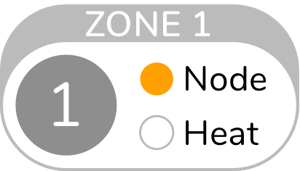
- Press and hold the Zone button on your Hub until the Node on your Hub light turns orange.
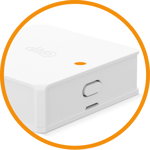
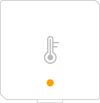
- Press and hold the button on the side of the temperature node until the light turns orange, (If the Node shows no light, then follow [these steps](https://help.homelyenergy.com/knowledge/how-do-i-replace-the-battery-in-my-homely-temperature-node?hsLang=en) to check the battery).
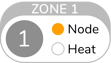
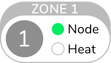
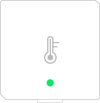
- The Hub and Node light will then change from orange to green to signify the Node is now connected. This can take up to 30 seconds.
|  |  |
| --- | --- |
|  |  |
- [Getting Started](https://help.homelyenergy.com/knowledge/getting-started?hsLang=en#main-content)
- [Your Homely System](https://help.homelyenergy.com/knowledge/getting-started?hsLang=en#your-homely-system)
- [Before you buy](https://help.homelyenergy.com/knowledge/getting-started?hsLang=en#before-you-buy)
- [Benefits of Homely](https://help.homelyenergy.com/knowledge/getting-started?hsLang=en#benefits-of-homely)
- [Heat Pump Functions](https://help.homelyenergy.com/knowledge/getting-started?hsLang=en#heat-pump-functions)
- [Using Homely](https://help.homelyenergy.com/knowledge/using-homely?hsLang=en#main-content)
- [Setting up your Preferences](https://help.homelyenergy.com/knowledge/using-homely?hsLang=en#setting-up-your-preferences)
- [Smart+ Features](https://help.homelyenergy.com/knowledge/using-homely?hsLang=en#smart-features)
- [Account Management](https://help.homelyenergy.com/knowledge/using-homely?hsLang=en#account-management)
- [Usage Data](https://help.homelyenergy.com/knowledge/using-homely?hsLang=en#usage-data)
- [Solar Sense](https://help.homelyenergy.com/knowledge/using-homely?hsLang=en#solar-sense)
- [Homeowner Troubleshooting](https://help.homelyenergy.com/knowledge/homeowner-troubleshooting?hsLang=en#main-content)
- [FAQs](https://help.homelyenergy.com/knowledge/homeowner-troubleshooting?hsLang=en#faqs)
- [Hardware](https://help.homelyenergy.com/knowledge/homeowner-troubleshooting?hsLang=en#hardware)
- [Switching to Heat Pump Controller](https://help.homelyenergy.com/knowledge/homeowner-troubleshooting?hsLang=en#switching-to-heat-pump-controller)
- [Heat Pump Errors](https://help.homelyenergy.com/knowledge/homeowner-troubleshooting?hsLang=en#heat-pump-errors)
- [Installer Resources](https://help.homelyenergy.com/knowledge/installer-resources?hsLang=en#main-content)
- [Why Homely](https://help.homelyenergy.com/knowledge/installer-resources?hsLang=en#why-homely)
- [Configuring Homely](https://help.homelyenergy.com/knowledge/installer-resources?hsLang=en#configuring-homely)
- [Compatibility and System Design](https://help.homelyenergy.com/knowledge/installer-resources?hsLang=en#compatibility-and-system-design)
- [Manuals](https://help.homelyenergy.com/knowledge/installer-resources?hsLang=en#manuals)
- [Connect](https://help.homelyenergy.com/knowledge/connect?hsLang=en#main-content)
- [About Connect](https://help.homelyenergy.com/knowledge/connect?hsLang=en#about-connect)
- [Managing Installations](https://help.homelyenergy.com/knowledge/connect?hsLang=en#managing-installations)
- [Installer Troubleshooting](https://help.homelyenergy.com/knowledge/installer-troubleshooting?hsLang=en#main-content)
- [Homely](https://help.homelyenergy.com/knowledge/installer-troubleshooting?hsLang=en#homely)
- [Troubleshooting with Connect](https://help.homelyenergy.com/knowledge/installer-troubleshooting?hsLang=en#troubleshooting-with-connect)
- [Samsung](https://help.homelyenergy.com/knowledge/installer-troubleshooting?hsLang=en#samsung)
[](https://www.homelyenergy.com)
www.homelyenergy.com
Copyright © 2026, Homely