---
title: How will I know if my Homely Temperature Node is connected with my Homely Hub, and how do I restore the connection if it has been lost?
description: How do I restore my Node's connection?
---
[Skip to content](https://help.homelyenergy.com/knowledge/how-will-i-know-if-my-homely-temperature-node-is-connected-with-my-homely-hub-and-how-do-i-restore-the-connection-if-it-has-been-lost#main-content)
- [English](https://help.homelyenergy.com/knowledge/how-will-i-know-if-my-homely-temperature-node-is-connected-with-my-homely-hub-and-how-do-i-restore-the-connection-if-it-has-been-lost)
- [Lietuvių](https://help.homelyenergy.com/lt/knowledge/kaip-sužinoti-ar-mano-homely-temperatūros-jutiklis-prijungtas-prie-homely-centro-ir-kaip-atkurti-ryšį-jei-jis-nutrūko)
- [Nederlands - Nederland](https://help.homelyenergy.com/nl-nl/knowledge/how-will-i-know-if-my-homely-temperature-node-is-connected-with-my-homely-hub-and-how-do-i-restore-the-connection-if-it-has-been-lost)
English
Show submenu for translations
[Contact us](https://help.homelyenergy.com/knowledge/kb-tickets/new?hsLang=en)
[![Homely logo white.png\]](https://help.homelyenergy.com/hs-fs/hubfs/Homely%20logo%20white.png?height=40&name=Homely%20logo%20white.png)](https://help.homelyenergy.com/knowledge?hsLang=en)
Open main navigation
Close main navigation
- - [English](https://help.homelyenergy.com/knowledge/how-will-i-know-if-my-homely-temperature-node-is-connected-with-my-homely-hub-and-how-do-i-restore-the-connection-if-it-has-been-lost)
- [Lietuvių](https://help.homelyenergy.com/lt/knowledge/kaip-sužinoti-ar-mano-homely-temperatūros-jutiklis-prijungtas-prie-homely-centro-ir-kaip-atkurti-ryšį-jei-jis-nutrūko)
- [Nederlands - Nederland](https://help.homelyenergy.com/nl-nl/knowledge/how-will-i-know-if-my-homely-temperature-node-is-connected-with-my-homely-hub-and-how-do-i-restore-the-connection-if-it-has-been-lost)
English
Show submenu for translations
- [Contact us](https://help.homelyenergy.com/knowledge/kb-tickets/new)
How can we help?
- There are no suggestions because the search field is empty.
1. [Knowledge base](https://help.homelyenergy.com/knowledge?hsLang=en)
2. [Homeowner Troubleshooting](https://help.homelyenergy.com/knowledge/homeowner-troubleshooting?hsLang=en)
3. [Hardware](https://help.homelyenergy.com/knowledge/homeowner-troubleshooting?hsLang=en#hardware)
# How will I know if my Homely Temperature Node is connected with my Homely Hub, and how do I restore the connection if it has been lost?
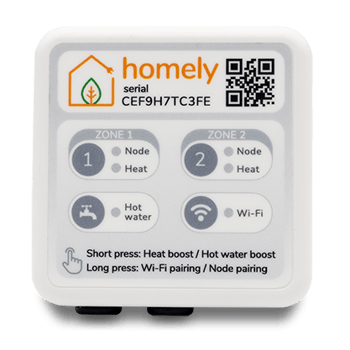
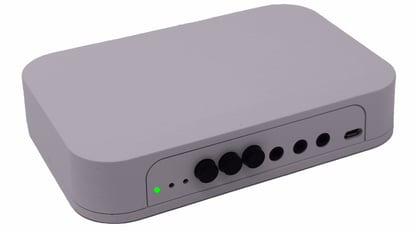
**Which of these Hubs do you have installed?**
[](https://help.homelyenergy.com/knowledge/how-will-i-know-if-my-homely-temperature-node-is-connected-with-my-homely-hub-and-how-do-i-restore-the-connection-if-it-has-been-lost#v3)
[](https://help.homelyenergy.com/knowledge/how-will-i-know-if-my-homely-temperature-node-is-connected-with-my-homely-hub-and-how-do-i-restore-the-connection-if-it-has-been-lost#v1)
---
---
### Troubleshooting Quick Reference
| 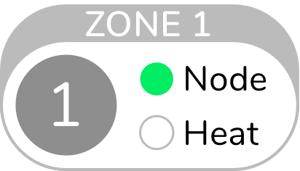 | Node is connected |
| --- | --- |
| 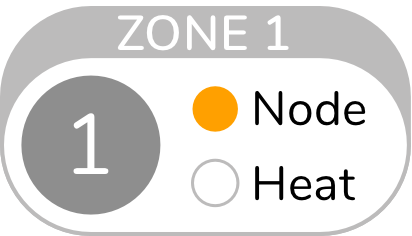 | Hub is in Node pairing mode |
| 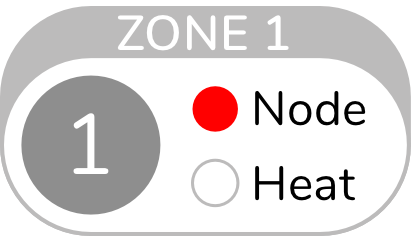 | Node connection has been lost |
If your Hub is showing amber or red on the Node light, then [follow the steps below to reconnect the Node](https://help.homelyenergy.com/knowledge/how-will-i-know-if-my-homely-temperature-node-is-connected-with-my-homely-hub-and-how-do-i-restore-the-connection-if-it-has-been-lost#node-step1).
---
### How to reconnect the Node to the Hub
The quickest way to reconnect your node to the Homely Hub is to use the guided pairing process in the Homely app.
1. Open the **Homely** app.
2. Tap the **More** tab.
3. Select **Connect Node to Homely Hub**.
4. Follow the on-screen instructions to complete the pairing process.
If your node still doesn't reconnect after following these steps, please continue with thepairing instructions below.
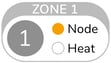
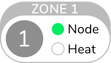
- Press and hold the Zone button on your Hub until the Node on your Hub light turns orange.
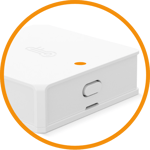
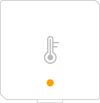
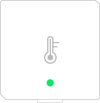
- Press and hold the button on the side of the temperature node until the light turns orange, (*If the Node shows no light, then [follow these steps to check the battery](https://help.homelyenergy.com/knowledge/how-will-i-know-if-my-homely-temperature-node-is-connected-with-my-homely-hub-and-how-do-i-restore-the-connection-if-it-has-been-lost#node-battery)*).
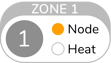
- The Hub and Node light will then change from orange to green to signify the Node is now connected. This can take up to 30 seconds.
|  |  |
| --- | --- |
|  |  |
---
### Node still not connected?
Unplug the power cable to the Homely Hub and plug it back in after 30 seconds.
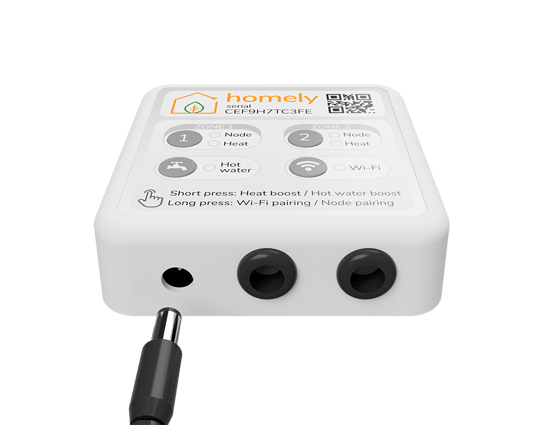
Allow up to 60 seconds for the Hub to power up fully, during which all the lights will turn white.
The Node light should now be green, if not [follow the above steps again to reconnect](https://help.homelyenergy.com/knowledge/how-will-i-know-if-my-homely-temperature-node-is-connected-with-my-homely-hub-and-how-do-i-restore-the-connection-if-it-has-been-lost#node-step1).
**If you are still [unable to connect the Node then contact a member of the team](https://help.homelyenergy.com/knowledge/how-can-i-contact-you?hsLang=en).**
---
Checking Node Battery
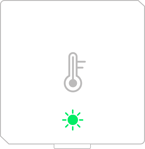
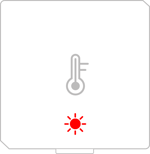
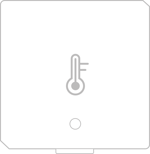
To check the Node battery press the button, the light will show one of the below options:
| **Battery OK** 1 green flash | **Battery Low** 1 red flash | **Hardware Fault** 5 red flashes | **Battery Dead** No light response |
| --- | --- | --- | --- |
|  |  |  |  |
[Follow our guide for changing the battery in your Node.](https://help.homelyenergy.com/knowledge/how-do-i-replace-the-battery-in-my-homely-temperature-node?hsLang=en)
**Tips for staying connected**
Make sure that your Homely Hub and Homely Temperature Node are less than 16 meters apart.
As with any wireless connection, the thickness of internal walls and the presence of large, heavy items of furniture can hamper connectivity. If you think that could be an issue then consider moving the Homely Temperature Node to an alternative spot within the home.
---
### **Troubleshooting Quick Reference**
A flashing light nearest to the buttons indicates your connection to the Node has been lost.
*(The light nearest to the buttons will be off to indicate the Node is connected)*
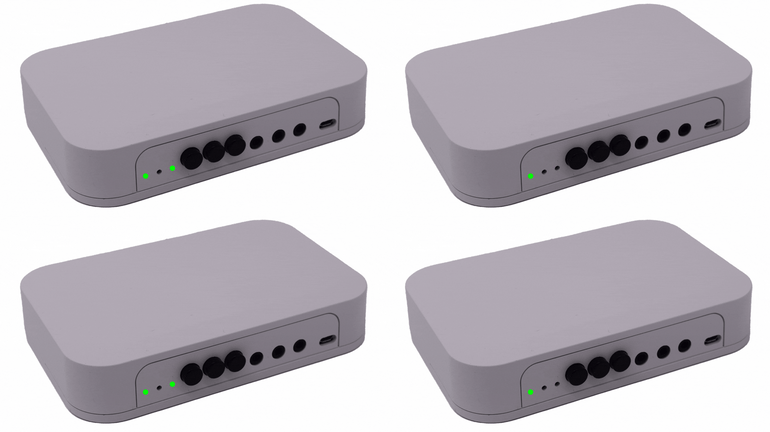
Your Homely app should show a temperature and no longer show any issues with the node.
---
### **How do I restore my Node's connection?**
The quickest way to reconnect your node to the Homely Hub is to use the guided pairing process in the Homely app.
1. Open the **Homely** app.
2. Tap the **More** tab.
3. Select **Connect Node to Homely Hub**.
4. Follow the on-screen instructions to complete the pairing process.
If your node still doesn't reconnect after following these steps, please continue with thepairing instructions below.
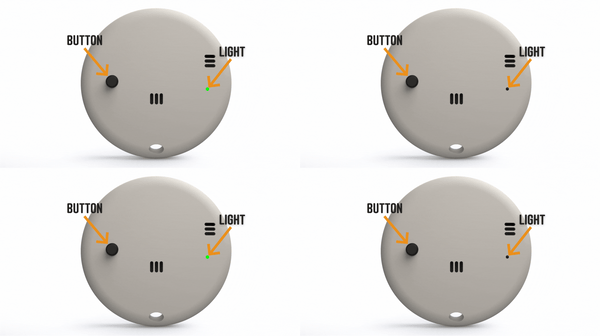
- Press the Node button, the Node light should flash.
- If the Node light doesn't flash, press the Node button three times. If there is still no light on the Node then [check the Node Battery](https://help.homelyenergy.com/knowledge/how-do-i-replace-the-battery-in-my-homely-temperature-node?hsLang=en).
- You can now check if the light nearest to the buttons on the Hub has stopped flashing and is off.
---
### **If the Node is still not connected**
- Press and hold the button furthest away from the lights on the Hub for 5 seconds.
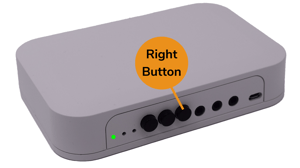
- Press and hold the Node button for 12 seconds.
- You can now check if the light nearest to the buttons on the Hub has stopped flashing and is off.
- You can also check the updated date/time inside the Homely App on the Home Screen.
**Still not working**
Unplug the power cable to the Homely Hub and plug it back in after 30 seconds.
Allow up to 60 seconds for the Hub to power up fully and then try the above steps again.
**If you are still [unable to connect the Node then contact a member of the team](https://help.homelyenergy.com/knowledge/how-can-i-contact-you?hsLang=en).**
**Tips for staying connected**
Make sure that your Homely Hub and Homely Temperature Node are less than 8 meters apart.
As with any wireless connection, the thickness of internal walls and the presence of large, heavy items of furniture can hamper connectivity. If you think that could be an issue then consider moving the Homely Temperature Node to an alternative spot within the home.
- [Getting Started](https://help.homelyenergy.com/knowledge/getting-started?hsLang=en#main-content)
- [Your Homely System](https://help.homelyenergy.com/knowledge/getting-started?hsLang=en#your-homely-system)
- [Before you buy](https://help.homelyenergy.com/knowledge/getting-started?hsLang=en#before-you-buy)
- [Benefits of Homely](https://help.homelyenergy.com/knowledge/getting-started?hsLang=en#benefits-of-homely)
- [Heat Pump Functions](https://help.homelyenergy.com/knowledge/getting-started?hsLang=en#heat-pump-functions)
- [Using Homely](https://help.homelyenergy.com/knowledge/using-homely?hsLang=en#main-content)
- [Setting up your Preferences](https://help.homelyenergy.com/knowledge/using-homely?hsLang=en#setting-up-your-preferences)
- [Smart+ Features](https://help.homelyenergy.com/knowledge/using-homely?hsLang=en#smart-features)
- [Account Management](https://help.homelyenergy.com/knowledge/using-homely?hsLang=en#account-management)
- [Usage Data](https://help.homelyenergy.com/knowledge/using-homely?hsLang=en#usage-data)
- [Solar Sense](https://help.homelyenergy.com/knowledge/using-homely?hsLang=en#solar-sense)
- [Homeowner Troubleshooting](https://help.homelyenergy.com/knowledge/homeowner-troubleshooting?hsLang=en#main-content)
- [FAQs](https://help.homelyenergy.com/knowledge/homeowner-troubleshooting?hsLang=en#faqs)
- [Hardware](https://help.homelyenergy.com/knowledge/homeowner-troubleshooting?hsLang=en#hardware)
- [Switching to Heat Pump Controller](https://help.homelyenergy.com/knowledge/homeowner-troubleshooting?hsLang=en#switching-to-heat-pump-controller)
- [Heat Pump Errors](https://help.homelyenergy.com/knowledge/homeowner-troubleshooting?hsLang=en#heat-pump-errors)
- [Installer Resources](https://help.homelyenergy.com/knowledge/installer-resources?hsLang=en#main-content)
- [Why Homely](https://help.homelyenergy.com/knowledge/installer-resources?hsLang=en#why-homely)
- [Configuring Homely](https://help.homelyenergy.com/knowledge/installer-resources?hsLang=en#configuring-homely)
- [Compatibility and System Design](https://help.homelyenergy.com/knowledge/installer-resources?hsLang=en#compatibility-and-system-design)
- [Manuals](https://help.homelyenergy.com/knowledge/installer-resources?hsLang=en#manuals)
- [Connect](https://help.homelyenergy.com/knowledge/connect?hsLang=en#main-content)
- [About Connect](https://help.homelyenergy.com/knowledge/connect?hsLang=en#about-connect)
- [Managing Installations](https://help.homelyenergy.com/knowledge/connect?hsLang=en#managing-installations)
- [Installer Troubleshooting](https://help.homelyenergy.com/knowledge/installer-troubleshooting?hsLang=en#main-content)
- [Homely](https://help.homelyenergy.com/knowledge/installer-troubleshooting?hsLang=en#homely)
- [Troubleshooting with Connect](https://help.homelyenergy.com/knowledge/installer-troubleshooting?hsLang=en#troubleshooting-with-connect)
- [Samsung](https://help.homelyenergy.com/knowledge/installer-troubleshooting?hsLang=en#samsung)
[](https://www.homelyenergy.com)
www.homelyenergy.com
Copyright © 2026, Homely